Every identity, role and bucket on one page, joined into paths. You see which few lead somewhere that matters.
grants read on the sample map, in one read-only pass
to find the path that matters
from a build role to customer records
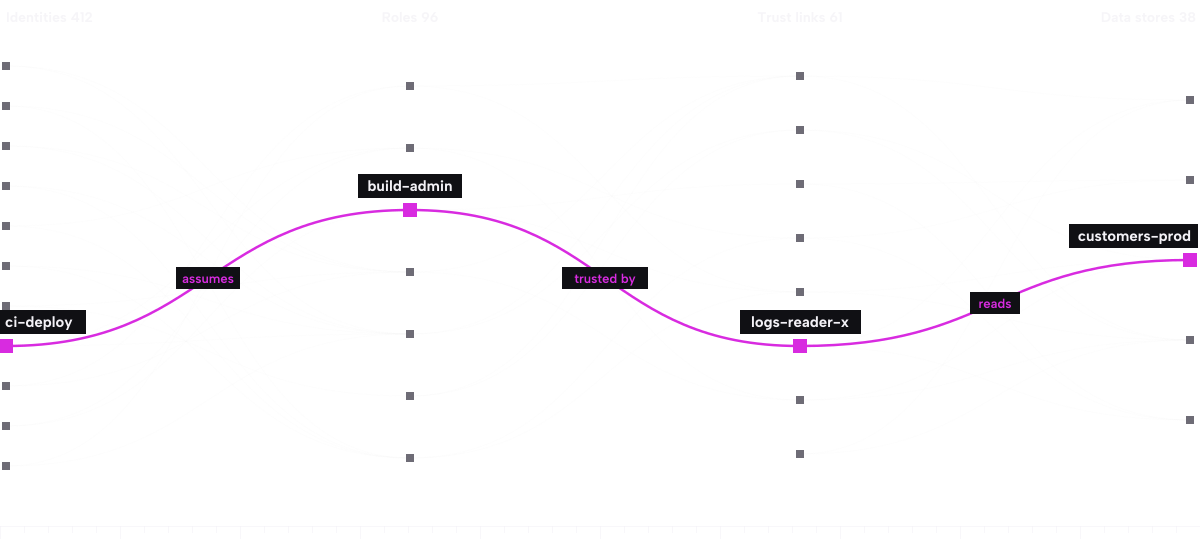
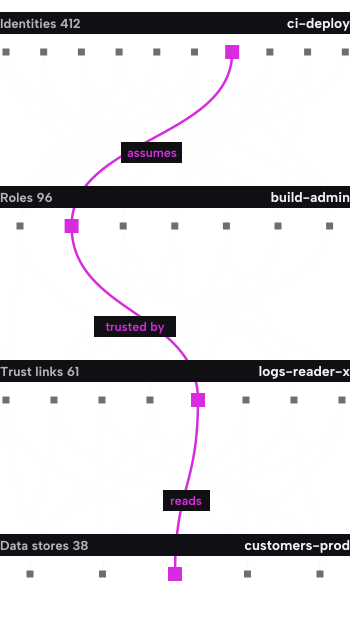
Identities 412, Roles 96, Trust links 61, Data stores 38. A line means one side can reach the other, and the bright line is the one to fix first.
A list of settings tells you what is wrong in one place. A path tells you what it adds up to. Here is the sample path, one hop at a time.
Hop | What can happen | Rated |
Start | ci-deploy, a build identity, runs on every merge to the main branch. | Entry |
Hop 1 | ci-deploy can assume build-admin, a role made for one release and never removed. | High |
Hop 2 | build-admin is trusted by logs-reader-x, which nobody has used in a year. | High |
Hop 3 | logs-reader-x can read customers-prod, the store that holds customer records. | Critical |
Sample map prod-eu. Sample data, account name invented.
Area | We read | We leave alone |
Identity | Users, service accounts, roles, policies and trust links | Passwords and the value of any secret |
Storage | Names, tags, structure and who can read each store | File contents and customer records |
Pipelines | Workflow files, and the roles each token can reach | Your source code |
Kubernetes | Service accounts and cluster roles | Running workloads: nothing is added to them |
It can list and describe settings. It cannot change anything, and it cannot open files or read records. The template is short enough to check line by line.
No. There are no agents and nothing is added to your workloads. You add one role, and one delete removes it.
A First Map is one reading, kept for 30 days. On the Team plan the map updates every hour.
AWS, Microsoft Azure and Google Cloud, along with the pipelines and Kubernetes clusters tied to them.
Free for one account. No card and no sales call.